Signature feature
Crystal-clear scans
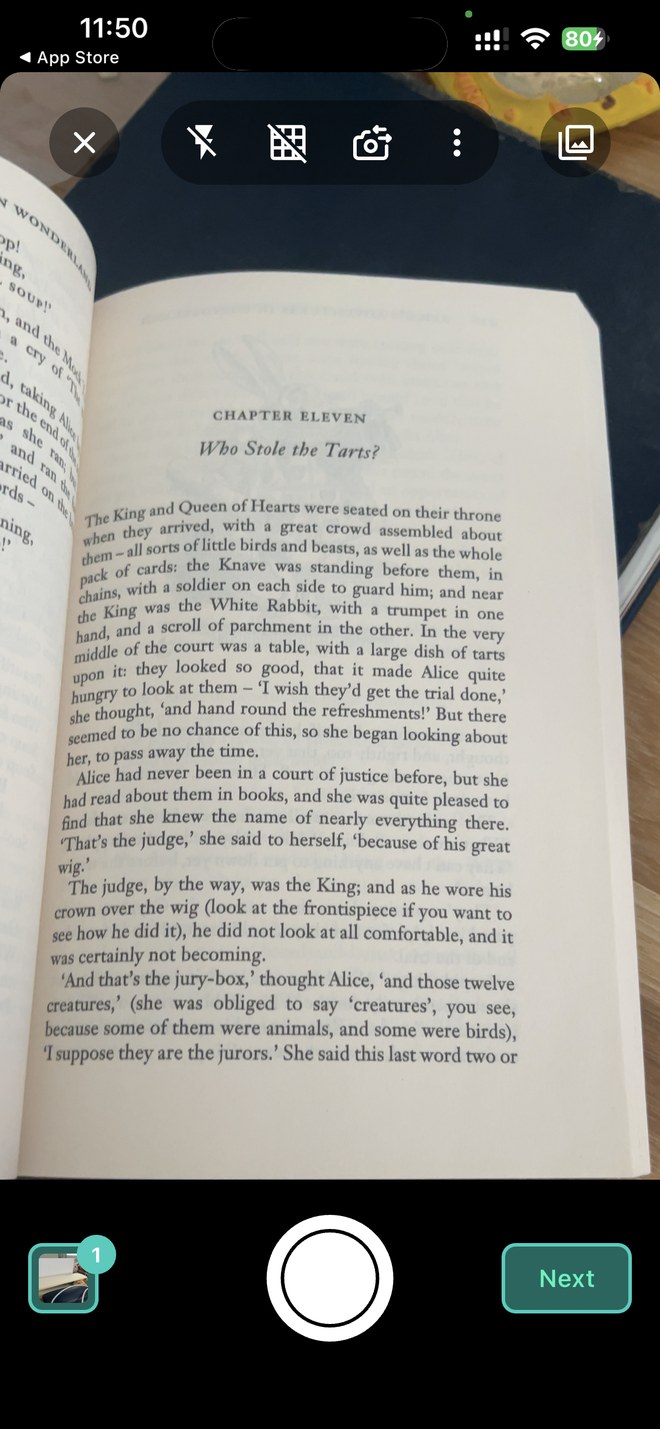
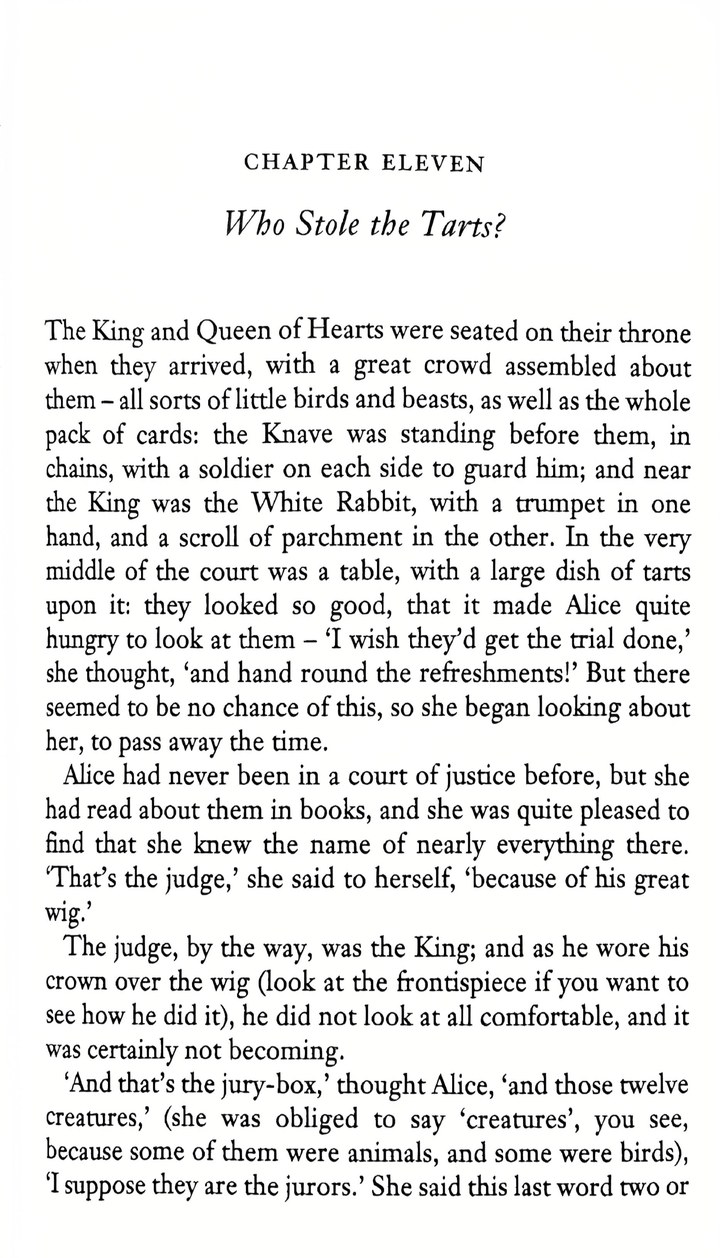
Auto de-glare, shadow removal, and enhance filters turn crumpled receipts and curved book pages into crisp, printed-quality documents.
Easy Scanner turns your phone into a powerful PDF scanner. Snap any document, get a crisp, glare-free PDF in seconds — then run OCR, e-sign, and let AI summarize and translate it, then sync to the cloud you already use. Free to download — Premium unlocks even more.
Free to download on iOS & Android. Optional Premium from $4.49/month.
Average App Store rating
Downloads worldwide
Paper to searchable PDF
Cloud apps to sync
No scanner, no cables, no learning curve — just your phone.
Point and shoot — or batch-scan a whole stack at once. Easy Scanner finds the page edges automatically.
Our Clear Text & Graphic engine auto-crops the page, removes glare and shadows, and sharpens text and color so every scan looks professionally printed.
Export a multi-page PDF or JPEG and send it anywhere — email, message, social, or cloud. Or ask the AI to summarize it first.
One app for scanning, OCR, e-signing, and AI — no second tool needed.
Auto de-glare, shadow removal, and enhance filters turn crumpled receipts and curved book pages into crisp, printed-quality documents.
Make any scan searchable, selectable, and copyable — a full OCR scanner app built in.
Auto-crops and straightens every page, even at an angle.
Combine a stack into one tidy, multi-page PDF.
Scan a whole pile in a single pass.
Sign contracts and blur sensitive info without leaving the app.
Send to Google Drive, Dropbox, OneDrive, Box, or Evernote — or keep everything offline.
Print to nearby printers or share as PDF/JPEG in a tap.
System-aware, easy on the eyes and your battery.
Easy Scanner's built-in AI reads, answers, and organizes your documents for you.
Chat with any scan and get instant answers cited to the exact page — no more scrolling through 40 pages of a contract.
Pull the key points from long contracts, reports, and statements in seconds.
Turn a foreign contract, menu, or travel document into your language on the spot.
Easy Scanner reads each scan and names it for you — Electric_Bill_June_2026.pdf — then files it in the right folder automatically.
Receipts, IDs, business cards, books, contracts — Easy Scanner knows what it's looking at and captures it perfectly.
Auto-grabs merchant, date, and total, then exports to a spreadsheet for taxes and expenses. The receipt scanner that does the data entry for you.
Perfectly cropped, glare-free ID scans for forms and applications.
Scan a card and pull out name, company, phone, and email automatically.
AI flattens curved pages so two-page spreads scan clean.
Multi-page capture with OCR, e-sign, and one-tap summarize.
Students & notes · Freelancers & receipts · Remote work & contracts · Travel & IDs · Whiteboards & meetings
Capture on your phone, then back up and sync to the cloud accounts you already use — your documents, available anywhere.
Google Drive, Dropbox, OneDrive, Box, or Evernote.
Capture and enhance without a connection.
Share scans anywhere in a tap.
Name, tag, and file scans into folders.
Print to nearby printers or keep a cloud backup.
Your scans, the way you want them — on your device, in your cloud, or both.
Crisp Clear Text & Graphic output, built-in OCR and AI, e-sign, and cloud sync — all in one simple app.
Switching from another scanner app? Easy Scanner is the simple, familiar scanner you loved — now with AI and Clear Text & Graphic enhancement built in. Make the move in one tap.
Switch to Easy Scanner★★★★★ 4.6 stars on the App Store — here's why people switch and stay.
"The scans come out cleaner than my office scanner — no glare, no shadows. And I can actually search the text."
"I asked it to summarize a 30-page lease and it pulled the exact rent and end date with a link to the page. On my phone. Offline."
"Crisp scans, real OCR, and it syncs straight to my Drive. I deleted two other scanner apps."
"Receipt mode grabs the total and date automatically — tax season finally takes minutes."
Reviews shown are illustrative placeholders — replace with verified App Store reviews before launch.
Everything you want to know before you scan your first page.
Yes — Easy Scanner is free to download and scan. Premium unlocks extras like batch scanning, watermark-free exports, unlimited folders, and 10GB+ cloud storage, from $4.49/month or $42.99/year. Cancel anytime.
Yes. Back up and sync your scans to Google Drive, Dropbox, OneDrive, Box, or Evernote — or keep them on your device and work offline. You choose where your documents live.
Yes. Easy Scanner is a full OCR scanner app — it extracts text so your scans are searchable, selectable, and copyable.
Yes. Ask your doc anything and get answers with citations to the exact page, summarize long documents in one tap, and translate into 100+ languages.
Multi-page PDF or JPEG, ready to share by email, message, social, or cloud.
Yes — capture, enhance, and OCR work offline. Cloud sync and AI features use a connection when available.
Absolutely. It's the same simple, free scanning you loved — with AI and de-glare added on top.
Free to download on iOS and Android. Your first crisp, glare-free PDF is three taps away.
Free to download · Premium from $4.49/month · Cancel anytime.